Nalu.Maui.Scaffold


A complete application shell for .NET MAUI — tab bar, nav bar, drawers, popups,
bottom sheets, page transitions and shared elements — replacing MAUI Shell as the host for
Nalu navigation, on iOS and Android.
Nalu.Maui.Navigationkeeps working with MAUI Shell exactly as before — the Scaffold is an additional host, not a breaking change.
Why a Scaffold?
MAUI Shell owns the chrome natively, and that ownership is the root of a long tail of problems:
- Native nav/tab bars are style-limited — iOS especially: no full control over heights, transitions, translucency, or content. Every "customize the tab bar" request eventually hits a platform wall.
- Chrome behavior differs per platform — safe areas, title views, animations and back handling all behave subtly differently between iOS and Android Shell.
- Navigation events can bypass the pipeline — e.g. tab switches performed by native chrome don't reliably route through cancelable navigation, breaking guards and lifecycle.
The Scaffold flips the model: every piece of chrome is a MAUI view drawn by Nalu, and every navigation — tab tap, back gesture, flyout selection — routes through the Nalu navigation engine (guards, lifecycle, intents included). What you style is what renders, identically, on both platforms.
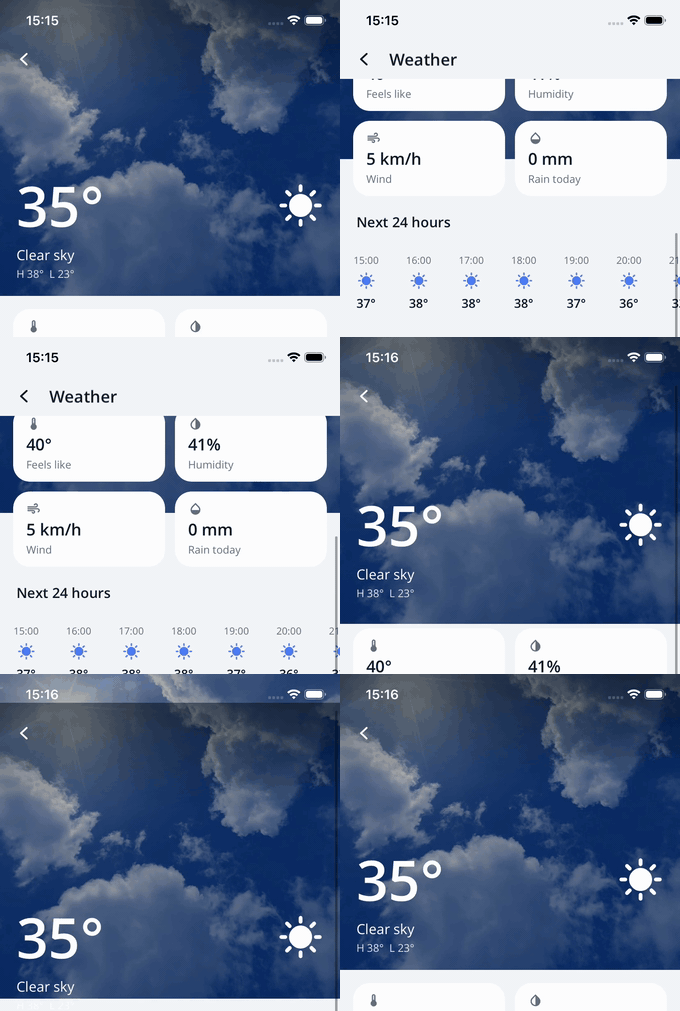
One page of the sample app: full-bleed photo header, scroll-materializing nav bar, fading title, parallax — and the status-bar icons flipping to match. All declarative.
What you get:
| Feature | Docs |
|---|---|
| Areas, roots and the tab bar (with overflow) | Structure & Tab Bar |
| Nav bar and the appearance system | Nav Bar |
| Scroll tracker, materializing chrome, parallax | Scroll-Driven Effects |
| Drawers on both sides | Flyouts |
| Popups, bottom sheets, tab bar panels, MVVM overlays | Popups & Sheets |
| Page transitions, shared elements, modal pages, predictive back | Transitions |
| Status-bar icon styles that follow your UI | System Bars |
| Using the Scaffold without page models | View-Only Navigation |
Moving from NaluShell |
Migration Guide |
Quick Start
The fastest start is the dotnet new template — a ready-to-run app hosted by the
Scaffold, with model-first navigation, a tab bar, a shared-element transition and predictive
back already wired:
dotnet new install Nalu.Maui.Templates
dotnet new maui-nalu-scaffold -n MyApp
The generated app also ships agent skills for AI coding assistants (AGENTS.md, CLAUDE.md
and .claude/skills/nalu-* — navigation, lifecycle, scaffold structure, transitions, overlays,
keyboard): concise, verified references an agent loads on demand instead of guessing Nalu APIs
from Shell habits.
To add the Scaffold to an existing app instead, follow the steps below.
1. Installation
dotnet add package Nalu.Maui.Scaffold
2. Setup in MauiProgram.cs
The Scaffold hosts Nalu navigation — register both:
builder
    .UseMauiApp<App>()
    .UseNaluNavigation<App>(nav => nav
        .AddPage<TodayPageModel, TodayPage>()
        .AddPage<SettingsPageModel, SettingsPage>())
    .UseNaluScaffold();
UseNaluScaffold() is required (it registers the scaffold handler and the platform
keyboard wiring: MAUI's iOS keyboard manager is disconnected, Android goes edge-to-edge with
adjustResize — see Soft Keyboard; do not combine it with
UseNaluSoftKeyboardManager). Page registration, view models, intents and
lifecycle are standard Nalu navigation — see the Navigation docs.
No MVVM? No problem. Page models are optional: register plain pages with
AddPage<TodayPage>(), navigate withPush<DetailPage>(), and implement lifecycle interfaces (IEnteringAware,ILeavingGuard, intents…) directly on the page — or bring your own MVVM abstraction as a thin facade overINavigationService. Guards, transitions, gestures and tab-stack preservation all work identically. See View-Only Navigation.
3. Define your application structure
The Scaffold is a XAML element describing the whole app: areas → roots → pages.
<nalu:Scaffold xmlns="http://schemas.microsoft.com/dotnet/2021/maui"
xmlns:x="http://schemas.microsoft.com/winfx/2009/xaml"
xmlns:nalu="https://nalu-development.github.com/nalu/scaffold"
xmlns:pages="clr-namespace:MyApp.Pages"
x:Class="MyApp.AppScaffold">
<nalu:ScaffoldTabBar>
<nalu:ScaffoldRoot Title="Today" PageType="{x:Type pages:TodayPage}">
<nalu:ScaffoldRoot.Icon>
<FontImageSource FontFamily="Material" Glyph="" Size="24" />
</nalu:ScaffoldRoot.Icon>
</nalu:ScaffoldRoot>
<nalu:ScaffoldRoot Title="Settings" PageType="{x:Type pages:SettingsPage}" />
</nalu:ScaffoldTabBar>
</nalu:Scaffold>
Each ScaffoldRoot owns an independent navigation stack; the tab bar renders with the default
Telegram-style pill (fully restylable, or replaceable wholesale).
4. Host it in the window
public partial class App : Application
{
    private readonly IServiceProvider _serviceProvider;

    public App(IServiceProvider serviceProvider)
    {
        _serviceProvider = serviceProvider;
        InitializeComponent();
    }

    protected override Window CreateWindow(IActivationState? activationState)
        => new(_serviceProvider.GetRequiredService<AppScaffold>());
}
Register the scaffold subclass itself as a singleton (builder.Services.AddSingleton<AppScaffold>()).
5. Navigate as usual
Nothing changes on the navigation side — the same INavigationService, relative/absolute
navigations, guards and intents:
await navigationService.GoToAsync(Navigation.Relative().Push<WeatherDetailPageModel>());
Tab taps, the Android back gesture/button, the iOS edge-swipe pop and flyout selections all
route through the same engine — ILeavingGuard and lifecycle events fire exactly as for
programmatic navigations.
That also means engine-level features light up unchanged — including
navigation state restoration: opt in with
builder.UseNaluNavigationRestore(...) and the app lands exactly where it was after
a restart (the Scaffold is the verified host).
Sample app
The repository contains Daily Helper (Samples/Nalu.Maui.DailyHelper), a complete
Scaffold-based sample: three tabs, scroll-driven transparent nav bar over a photo header,
shared-element push/pop, popups, sheets and system-bar integration. It is the best starting
point to see everything working together.
Platform support
- Scaffold hosting (the chrome, transitions, gestures): iOS 15+ and Android
API 30+ (keyboard handling rides
UIView.keyboardLayoutGuideand edge-to-edge IME window insets — see Soft Keyboard). - The package is referencable from every platform (Windows/Mac Catalyst pick the neutral
net10.0assembly):UseNaluScaffold()is callable everywhere and always registersIOverlayServiceandIScaffoldFlyoutController, so shared page models keep injecting them — every call is a graceful no-op (default results, no UI) while the app is not scaffold-hosted. Hosting an actualScaffoldon Windows/Catalyst throwsPlatformNotSupportedException.