Nalu.Maui
Nalu.Maui is a set of libraries built to make .NET MAUI development faster, smoother and more
enjoyable — polished navigation, a fully drawn application shell, high-performance lists and
layout primitives that remove entire categories of boilerplate.
If Nalu.Maui is valuable to your work, consider supporting the project through GitHub Sponsors.

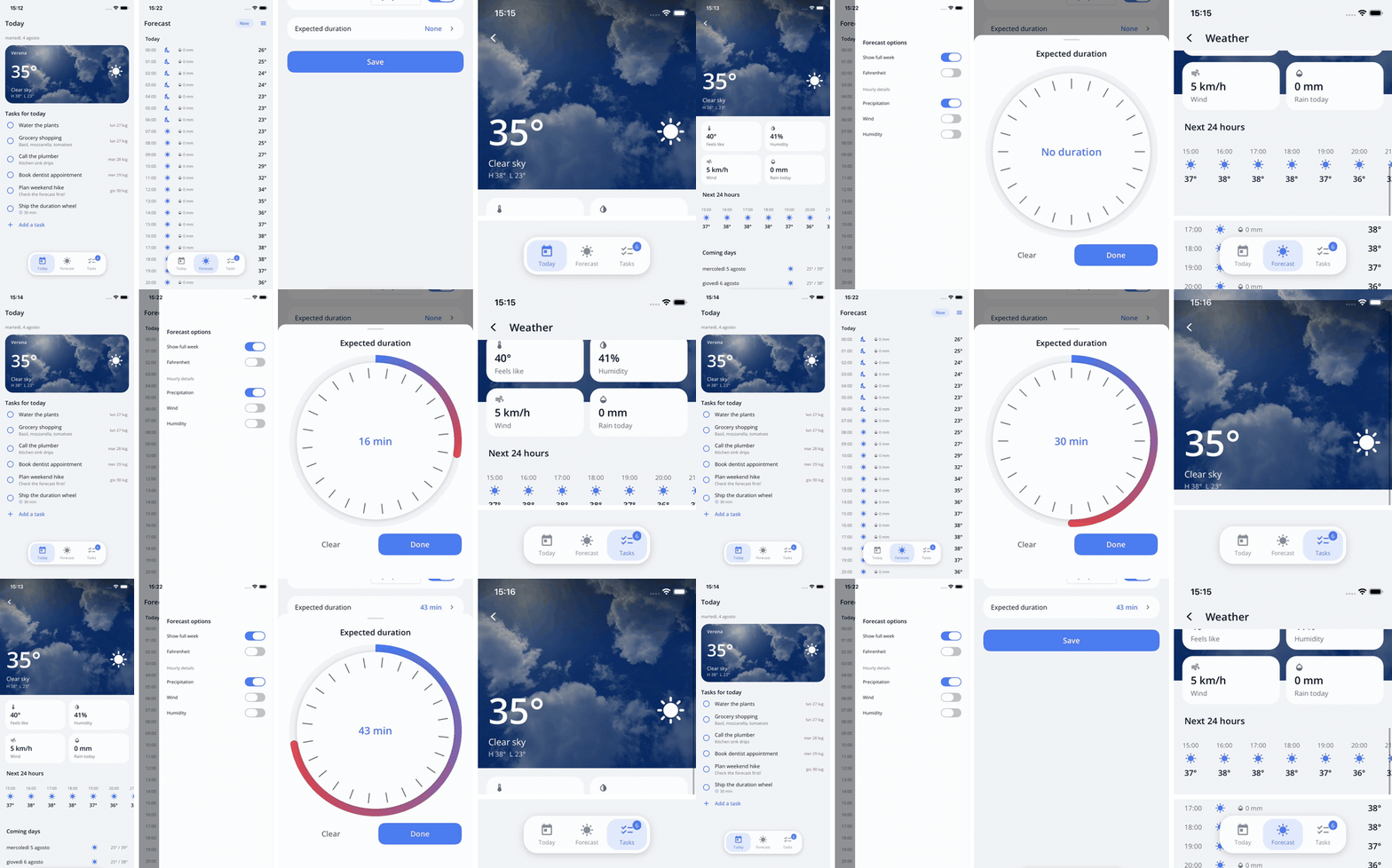
Shared elements flying between pages · per-page drawers · bottom sheets · scroll-materializing
nav bar · floating tab bar — every animation on this page comes from Daily Helper
(Samples/Nalu.Maui.DailyHelper), the complete sample app in the repository.
Navigation 

The MVVM navigation service offers a straightforward and robust method for navigating between
pages and passing parameters — with a fluent, type-safe API instead of strings, supporting
Relative and Absolute navigation, guards, and typed intents. It runs on MAUI Shell,
NaluShell, or the Scaffold. MVVM is optional: the same engine drives
view-only pages and MVU component pages —
MauiReactor via a small documented bridge, other component
frameworks through the same IComponentPageFactory extension point.
// Push the page registered with the DetailPageModel
await _navigationService.GoToAsync(Navigation.Relative().Push<DetailPageModel>());
// Navigate to the `SettingsPageModel` root page
await _navigationService.GoToAsync(Navigation.Absolute().Root<SettingsPageModel>());
Passing parameters is simple and type-safe.
// Pop the page and pass a parameter to the previous page model
await _navigationService.GoToAsync(Navigation.Relative().Pop().WithIntent(new MyPopIntent()));
// which should implement `IAppearingAware<MyPopIntent>`
Task OnAppearingAsync(MyPopIntent intent) { ... }
You can also define navigation guards to prevent navigation from occurring.
ValueTask<bool> CanLeaveAsync() => { ... ask the user };
Page registration is source-generated (AddPages() — trim/AOT-safe, no reflection), an
embedded leak-detector helps you identify memory leaks, and opt-in
state restoration reopens the app exactly where the user left it.
See more on the Navigation Wiki.
Scaffold 

A complete application shell replacing MAUI Shell as the navigation host — every piece of
chrome is a plain MAUI view with no customization limits:
tab bar with automatic overflow, nav bar with a per-property appearance system
and scroll-driven chrome, drawers, popups and bottom sheets, modal presentation, declarative
page transitions with shared elements, interactive back gestures (iOS edge swipe and
Android predictive back, both scrubbing the same seekable choreography), and system bars
that automatically contrast with your UI — identical on iOS and Android, all engine-routed
(guards and lifecycle always fire).
<nalu:Scaffold>
    <nalu:ScaffoldTabBar>
        <nalu:ScaffoldRoot Title="Home" PageType="{x:Type pages:HomePage}" />
        <nalu:ScaffoldRoot Title="Settings" PageType="{x:Type pages:SettingsPage}" />
    </nalu:ScaffoldTabBar>
</nalu:Scaffold>
Available on NuGet.org:
dotnet add package Nalu.Maui.Scaffold — or start from the ready-to-run template:
dotnet new install Nalu.Maui.Templates
dotnet new maui-nalu-scaffold -n MyApp
See more on the Scaffold Wiki — including the NaluShell migration guide.
VirtualScroll 

A fast virtualized scrolling view designed to replace the traditional CollectionView,
built directly on native RecyclerView (Android) and UICollectionView (iOS) with a native
hot path that keeps per-frame work off the managed heap — fling through thousands of
dynamically-sized rows without a stutter.
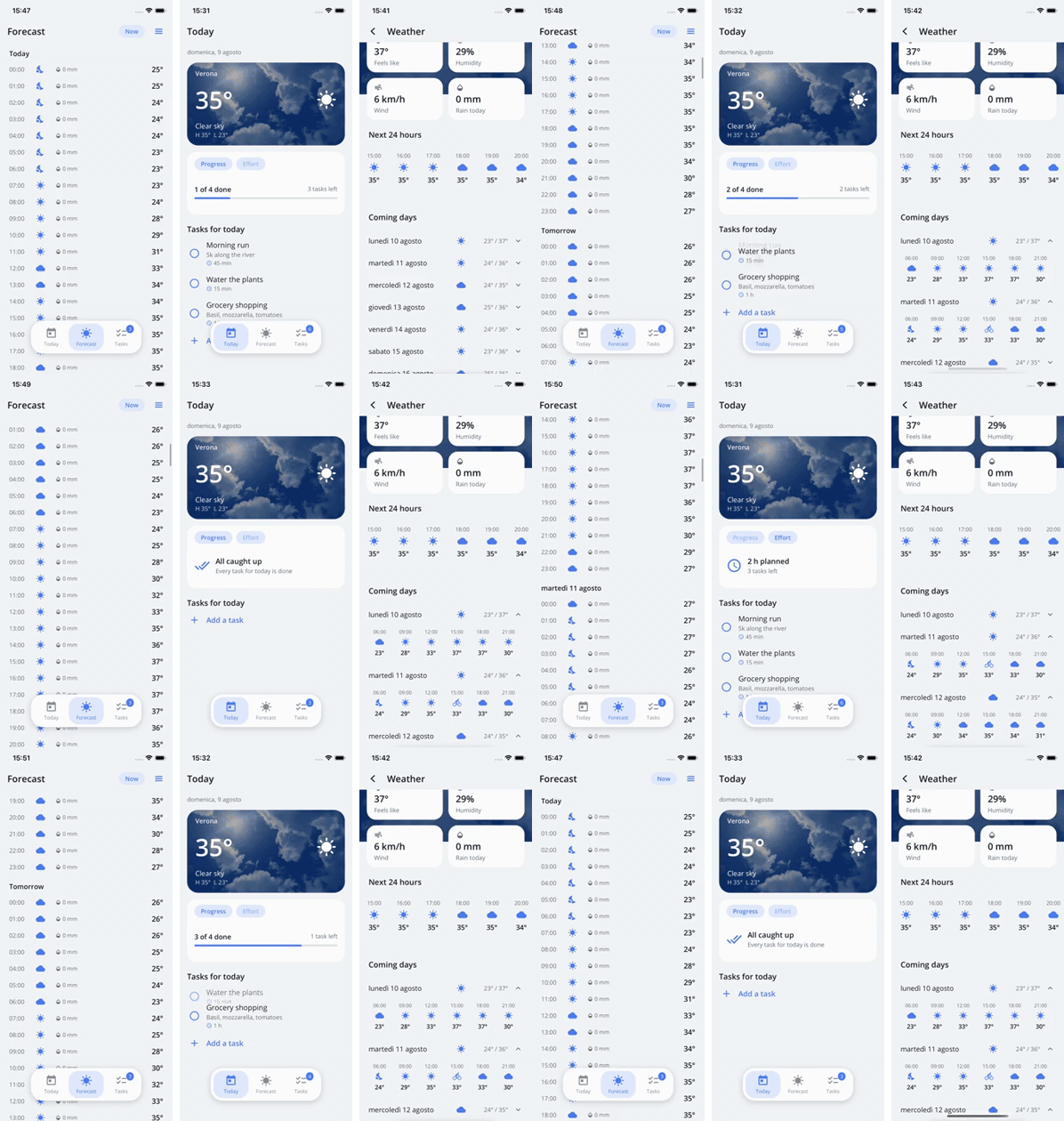
Left to right: VirtualScroll flinging through a week of hourly rows and jumping back with
an animated ScrollTo · SlideBox sliding between insight panels while a ToggleTemplate
flips to "All caught up" · ExpanderViewBox rows expanding inline.
- Optimized for Android (
RecyclerView) and Apple's (UICollectionView) - Based on an adapter pattern with full support for
ObservableCollection<T>change notifications (add, remove, move, replace) - Dynamic item sizing with automatic layout updates
- Long-press drag reorder, pull-to-refresh, animated
ScrollTo - Header, footer, and section templates; horizontal layout and carousel mode
<nalu:VirtualScroll ItemsSource="{Binding Items}">
    <nalu:VirtualScroll.ItemTemplate>
        <DataTemplate x:DataType="models:MyItem">
            <nalu:ViewBox>
                <Label Text="{Binding Name}" Padding="16" />
            </nalu:ViewBox>
        </DataTemplate>
    </nalu:VirtualScroll.ItemTemplate>
</nalu:VirtualScroll>
Note: This package uses a Non-Commercial License.
Find out more on the VirtualScroll Wiki.
Layouts 

The XAML you wish was built in — templates, scoped binding contexts, animated expanders, retained-state pagers and a constraint-based layout system.
- Have you ever dreamed of having an
ifstatement in XAML?<nalu:ToggleTemplate Value="{Binding HasPermission}" WhenTrue="{StaticResource AdminFormTemplate}" WhenFalse="{StaticResource PermissionRequestTemplate}" /> - Do you want to scope the binding context of a content?
<nalu:ViewBox ContentBindingContext="{Binding SelectedAnimal}" IsVisible="{Binding IsSelected}"> <views:AnimalView x:DataType="models:Animal" /> </nalu:ViewBox> - And what about rendering a
TemplateSelectordirectly like we do on aCollectionView?<nalu:TemplateBox ContentTemplateSelector="{StaticResource AnimalTemplateSelector}" ContentBindingContext="{Binding CurrentAnimal}" /> ExpanderViewBoxanimates expand/collapse with real measured sizes,SlideBoxpages between lazily-created, state-retaining slides, andMagnetbrings a full constraint-based layout system.
Find out more on the Layouts Wiki.
Live Activities 

Your app's live state on the system surfaces of both platforms from one semantic content model: an ActivityKit Live Activity on iOS (Lock Screen + Dynamic Island, widget built and embedded automatically by the package) and an Android 16 Live Update (status-bar chip + floating card), degrading gracefully on older Android. OS-ticked timers, stepped progress, action buttons — read more.
var activity = await liveActivities.StartAsync("delivery", new LiveActivityContent
{
    Title = "Pizza on the way",
    ChipText = "12 min",
    Progress = new LiveActivityProgress { Value = 0.4 },
    Timer = LiveActivityTimer.CountDown(order.Eta),
});

await activity.UpdateAsync(c => c.Progress!.Value = 0.8);
Available on NuGet.org:
dotnet add package Nalu.Maui.LiveActivities
Core 

The core library is intended to provide a set of common use utilities.
Do you have issues with the soft keyboard?
Nalu offers an alternative soft-keyboard manager that allows consistent behavior across Android and iOS, enabling the Resize/Pan mode on iOS too in a very convenient way.
<ContentPage>
    <Grid>
        <!-- Every input field inside this layout will use the Pan screen adjust mode -->
        <VerticalStackLayout naluCore:SoftKeyboardManager.SoftKeyboardAdjustMode="Pan">
            <Entry />
You can also easily bind the visibility of an element to the visibility of the keyboard using the SoftKeyboardManager.State observable object.
<VerticalStackLayout.IsVisible>
    <!-- example to show an area only when the keyboard is hidden -->
    <Binding Path="IsHidden" Source="{x:Static nalu:SoftKeyboardManager.State}" x:DataType="nalu:SoftKeyboardState" />
</VerticalStackLayout.IsVisible>
Have you noticed failed network requests when the app is backgrounded on iOS?
Have you ever noticed that when the user backgrounds the app on iOS, the app is suspended, and the network requests will fail due to The network connection was lost?
This is really annoying: it forces us to implement complex retry logic, especially considering that the request may have already hit the server.
To solve this issue, we provide a NSUrlBackgroundSessionHttpMessageHandler to be used in your HttpClient to allow http request to continue even when the app is in the background.
#if IOS
    var client = new HttpClient(new NSUrlBackgroundSessionHttpMessageHandler());
#else
    var client = new HttpClient();
#endif
Check out the Core Wiki for more information.
Controls 

The controls library provides a set of cross-platform controls to simplify your development.
- A
InteractableCanvasViewwhich is aSkiaSharpSKCanvasViewwith touch-events support where you can choose to stop touch event propagation to avoid interaction with ancestors (likeScrollView) - A
TimeSpan?edit control namedDurationWheelwhich allows the user to enter a duration by spinning a wheel — shown inside the bottom sheet in the showcase above!
Find out more on the Controls Wiki.