Use Cases
Recipes for the situations live activities were made for. Every example is plain library API — no platform branches anywhere; degraded/unavailable surfaces are handled by the support model.
Delivery with steps
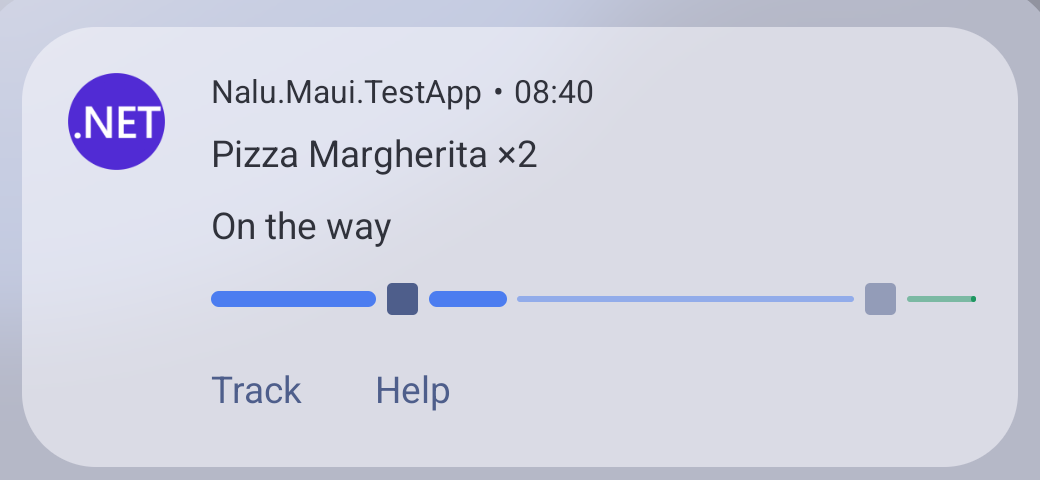
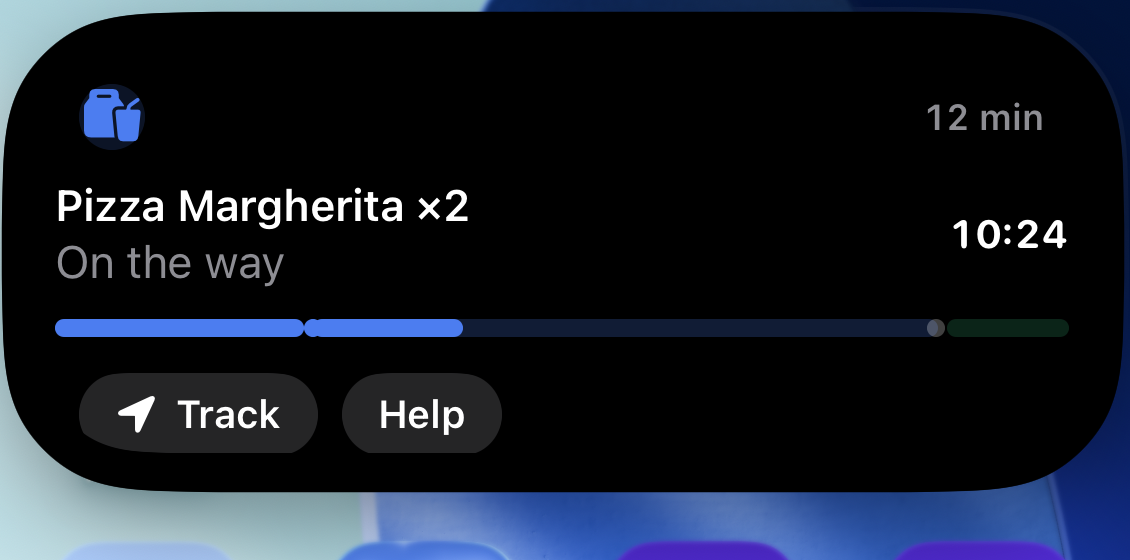
The classic. The journey has phases (segments) and milestones (points): the bar is
split preparing · driving · at the door, with dots marking the phase boundaries that fill
as they are passed. The ETA ticks natively; StaleAt flips it to overflow by itself if the
driver is late.
LiveActivityProgress StepsProgress(double value) => new()
{
    Value = value,
    Segments =
    [
        new LiveActivityProgressSegment { Weight = 2 },                      // preparing
        new LiveActivityProgressSegment { Weight = 5 },                      // driving
        new LiveActivityProgressSegment { Weight = 1, Color = "#30A46C" },   // at the door
    ],
    Points =
    [
        new LiveActivityProgressPoint { Position = 0.25 },   // out of the kitchen
        new LiveActivityProgressPoint { Position = 0.875 },  // reached your street
    ],
};

var activity = await liveActivities.StartAsync("delivery", new LiveActivityContent
{
    Title = "Pizza Margherita ×2",
    Subtitle = "Preparing your order",
    ChipText = "prep",
    ChipIcon = "takeoutbag.and.cup.and.straw.fill",
    AccentColor = "#4C7DF0",
    Progress = StepsProgress(0.1),
    Timer = LiveActivityTimer.CountDown(order.Eta),
    StaleAt = order.Eta,
    DeepLink = "myapp://orders/42",
    Actions =
    [
        new LiveActivityAction { Id = "track", Label = "Track", Icon = "location.fill", DeepLink = "myapp://orders/42/map" },
    ],
});

// Phase changes are the only updates you send:
await activity.UpdateAsync(c => { c.Subtitle = "On the way";  c.ChipText = "12 min"; c.Progress = StepsProgress(0.4); });
await activity.UpdateAsync(c => { c.Subtitle = "At the door"; c.ChipText = "here";   c.Progress = StepsProgress(0.9); },
    new LiveActivityAlert("Your order has arrived"));

await activity.EndAsync(c =>
{
    c.Title = "Delivered";
    c.Subtitle = "Buon appetito!";
    c.ChipText = null;
    c.Progress = null;
    c.Timer = null;
});
On Android 16 the segments and points are the native ProgressStyle; the iOS widget draws
the same weighted capsule track with milestone dots. On Android 8–15 the segments merge into
a classic bar — same information, humbler clothes.
Appointment that can run over
Countdown while it lasts, overflow when it doesn't — the complete pattern (including the boundary flip) is walked through in Timers, and runnable in the TestApp's Live Activity Timer Tests page. The short version:
var activity = await liveActivities.StartAsync("appointment", new LiveActivityContent
{
    Title = "Standup meeting",
    Subtitle = "Time remaining",
    AccentColor = "#30A46C",
    Timer = LiveActivityTimer.CountDown(meetingEnd),
});

// One update at the boundary turns "remaining" into "running over":
await activity.UpdateAsync(c =>
{
    c.Subtitle = "Running over";
    c.AccentColor = "#E5484D";
    c.Timer = LiveActivityTimer.CountUp(meetingEnd);
});
Workout
A count-up with live stats in the chip. Time passes for free; you update only when the stats change (say, once per completed kilometer — not per second):
var activity = await liveActivities.StartAsync("workout", new LiveActivityContent
{
    Title = "Morning run",
    ChipIcon = "figure.run",
    AccentColor = "#F76B15",
    Timer = LiveActivityTimer.CountUp(DateTimeOffset.UtcNow),
});

await activity.UpdateAsync(c => c.ChipText = $"{km:0.0} km");

// Pause at the traffic light:
await activity.UpdateAsync(c => c.Timer = LiveActivityTimer.Paused(elapsed));
await activity.UpdateAsync(c => c.Timer = LiveActivityTimer.CountUp(DateTimeOffset.UtcNow - elapsed));

await activity.EndAsync(c =>
{
    c.Title = "Run complete";
    c.Subtitle = $"{km:0.0} km in {elapsed:hh\\:mm\\:ss}";
    c.Timer = null;
});
Download / export
Start indeterminate while the size is unknown, then switch to a real fraction — and end immediately when nobody needs a trophy notification:
var activity = await liveActivities.StartAsync("export", new LiveActivityContent
{
    Title = "Exporting video",
    Subtitle = "Preparing…",
    Progress = new LiveActivityProgress { Indeterminate = true },
});

await activity.UpdateAsync(c =>
{
    c.Subtitle = "Rendering";
    c.Progress = new LiveActivityProgress { Value = 0 };
});

// throttle your own reporting — the no-op suppression handles duplicates, not floods
await activity.UpdateAsync(c => { c.Progress!.Value = fraction; c.ChipText = $"{fraction:P0}"; });

await activity.EndAsync(finalPatch: null, LiveActivityDismissal.Immediate);
Live score
No progress, no timer — the chip is the product. Alert only on your team's goal:
var activity = await liveActivities.StartAsync("match", new LiveActivityContent
{
    Title = "Napoli – Inter",
    Subtitle = "First half",
    ChipText = "0–0",
    ChipIcon = "soccerball",
});

await activity.UpdateAsync(
    c => { c.ChipText = "1–0"; c.Subtitle = "Anguissa 23′"; },
    new LiveActivityAlert("GOAL — Napoli 1–0"));
0–0 in the status bar / Dynamic Island all match long, at the cost of one update per
actual event.
Ride arrival
Two ticking facts, one activity: countdown to pickup in the timer, cadence-limited detail in the subtitle. Note what is not here — no per-minute updates; the timer carries the urgency by itself:
var activity = await liveActivities.StartAsync("ride", new LiveActivityContent
{
    Title = "Marco · white Model 3",
    Subtitle = "AB 123 CD",
    ChipIcon = "car.fill",
    AccentColor = "#0B68CB",
    Timer = LiveActivityTimer.CountDown(pickupEta),
    StaleAt = pickupEta,
    Actions =
    [
        new LiveActivityAction { Id = "call", Label = "Contact driver", DeepLink = "myapp://ride/chat" },
    ],
});
The one habit that matters
Whatever the use case: reconcile on startup. Activities survive your process — check
liveActivities.Activities for a survivor of your kind and adopt it before starting a new
one, or you will stack a second chip next to the first
(details).