Nalu.SharpState


A compile-time, AOT-friendly state machine for .NET built on a Roslyn source generator. You declare states and triggers with attributes, describe transitions with a strongly-typed fluent API, and the generator emits a ready-to-use IActor surface with typed trigger methods.
Why SharpState?
Classic state machine libraries rely on reflection, dictionaries keyed by strings/enums at runtime, and object[] parameter bags. That costs boxing, breaks AOT, and pushes errors from compile time to the first user interaction.
Nalu.SharpState takes the opposite route:
- Declarative: states and triggers are C# constructs (a
static partialmethod is a trigger, astaticproperty is a state). - Strongly typed: trigger parameters become method parameters on the generated actor. Guards and actions see the exact types you declared.
- Compile-time validated: duplicate names, unreachable hierarchies, and misconfigured sub-machines become build errors via dedicated
NSS001–NSS010diagnostics. - AOT / trim friendly: zero reflection at runtime. The generator emits the registration tables at compile time.
- Hierarchical: composite states are modeled as nested
[SubStateMachine]partial classes with strict scoping rules. - Sync transitions: state changes always commit synchronously, so guards, target selection,
Invoke, entry/exit hooks, context notification, andStateChangedcomplete before post-transition async work begins. - Async-friendly follow-up: generated actors expose both synchronous
voidtrigger methods (Open,Close, …), which schedule post-transition async work fire-and-forget, and matchingValueTask*Asyncmethods, which awaitWhenExitedAsync,WhenEnteredAsync, andReactAsync; see Post-Transition Async Work. - Lightweight on CPU and memory: tables are emitted at compile time and dispatch is direct, so transitions spend less time on the hot path and allocate far less than typical reflection or dictionary-heavy approaches. The Benchmarks section compares
Nalu.SharpStateto Stateless on the same scenarios.
Installation
dotnet add package Nalu.SharpState
The package bundles the source generator, so no additional setup or UseXxx(...) call is required.
Optional dotnet add package Nalu.SharpState.DependencyInjection brings in Microsoft.Extensions.DependencyInjection (8.0.x on net8.0, 10.0.x on net10.0) and adds StateMachineServiceProviderResolver (namespace Nalu.SharpState) plus ServiceCollectionStateMachineExtensions in Microsoft.Extensions.DependencyInjection (AddScopedStateMachineServiceProviderResolver, AddSingletonStateMachineServiceProviderResolver).
Anatomy of a machine
A machine lives in a single static partial class (for example public static partial class MyMachine) marked with [StateMachineDefinition]. It is made of four building blocks:
| Building block | Declared as | Role |
|---|---|---|
| Context | Any class you own | Holds machine-facing state (counters, domain fields, flags the guards and actions update). Passed as the first argument to [StateMachineDefinition]. Prefer requesting services (ILogger, repositories, HttpClient, …) as callback parameters in When / Invoke / ReactAsync overloads rather than storing them on the context. |
| Service provider | IServiceProvider |
Supplies injected callback services and, for scheduled post-transition async work, optionally scoped services. See Service provider and actor factories. |
| Triggers | [StateTriggerDefinition] static partial void methods |
Inputs to the machine. Their parameter list becomes the dispatch signature. The generator emits a per-trigger args type ({Trigger}Args) plus a machine-wide tagged TriggerArgs for dispatch into callbacks. Fluent When / Invoke / ReactAsync / lifecycle hooks optionally take injectable services as generic T1…T16 overload parameters (distinct from trigger payload arity). |
| States | [StateDefinition] static IStateConfiguration properties |
Nodes of the machine. The property body configures outgoing transitions. |
Here is a minimal door:
using Nalu.SharpState;

public class DoorContext
{
    public int OpenCount { get; set; }
    public string? LastReason { get; set; }
}

[StateMachineDefinition(typeof(DoorContext))]
public static partial class DoorMachine
{
    [StateTriggerDefinition] static partial void Open(string reason);
    [StateTriggerDefinition] static partial void Close();

    [StateDefinition(Initial = true)]
    private static IStateConfiguration Closed { get; } = ConfigureState()
        .OnOpen(t => t
            .TransitionTo(State.Opened)
            .Invoke((ctx, args) =>
            {
                ctx.OpenCount++;
                ctx.LastReason = args.Reason;
            }));

    [StateDefinition]
    private static IStateConfiguration Opened { get; } = ConfigureState()
        .OnClose(t => t.TransitionTo(State.Closed));
}
The generator produces:
- A
Stateenum with the valuesClosed, Opened. - A
Triggerenum with the valuesOpen, Close. - A nested
public interface IActorexposingCanOpen(string),Open(string),OpenAsync(string),CanClose(),Close(),CloseAsync(),CurrentState,Context,IsIn(...),StateChanged,ReactionFailed, andOnUnhandled. - Nested factory delegates for dependency injection:
CreateActorFactory/CreateActorWithStateFactory— matchCreateActor(context, IStateMachineServiceProviderResolver serviceProviderResolver)andCreateActorWithState(..., resolver, state).
- A
public static State GetInitialState()helper for the root machine. - A
public static string ToDot()helper that renders the machine as a Graphviz DOT graph. - A
public static string ToMermaid()helper that renders the machine as a MermaidstateDiagram-v2. public static IActor CreateActor(DoorContext context, IStateMachineServiceProviderResolver serviceProviderResolver)andCreateActorWithState(..., resolver, state).
Usage:
using System;
using System.Threading.Tasks;
using Microsoft.Extensions.DependencyInjection;
using Nalu.SharpState;

IServiceProvider root = ...; // e.g. Host.Services or another composition root

var scopeFactory = root.GetRequiredService<IServiceScopeFactory>();
var resolver = new StateMachineServiceProviderResolver(root, scopeFactory);
var door = DoorMachine.CreateActor(new DoorContext(), resolver);

door.Open("delivery");           // sync trigger; post-transition async is scheduled
// or
await door.OpenAsync("delivery");  // awaits WhenExitedAsync → WhenEnteredAsync → ReactAsync

Console.WriteLine(door.CurrentState);     // Opened
Console.WriteLine(door.Context.OpenCount); // 1
Add the Nalu.SharpState.DependencyInjection package and use Nalu.SharpState.StateMachineServiceProviderResolver. The actor captures GetServiceProvider() for synchronous guards, target selectors, actions, and for FireAsync. Scheduled post-transition work after Fire uses one reaction-scoped provider from CreateScopedServiceProvider per run. See Service provider and actor factories and Post-Transition Async Work.
Service provider and actor factories
SharpState only uses IServiceProvider for dependency injection. The [StateMachineDefinition] attribute describes the context type only:
[StateMachineDefinition(typeof(DoorContext))]
public static partial class DoorMachine;
IStateMachineServiceProviderResolver has two jobs:
GetServiceProvider()supplies the provider captured by the actor for synchronousWhen,TransitionTo,Invoke,WhenEntering, andWhenExitingclauses, and forFireAsync/ generated{Trigger}Asyncpost-transition work.CreateScopedServiceProvider(out IServiceProvider)supplies a provider for scheduled post-transition work after synchronousFire/voidtrigger methods. The engine calls it once per scheduled pipeline (async lifecycle hooks plusReactAsync) and disposes the token when that pipeline completes. See Post-Transition Async Work for ordering and failure behavior.
For machines that do not resolve services, pass StateMachineEmptyServiceProviderResolver.Instance:
var actor = MyMachine.CreateActor(context, StateMachineEmptyServiceProviderResolver.Instance);
Use StateMachineStaticServiceProviderResolver (in Nalu.SharpState) when synchronous clauses and post-transition async work should reuse the same provider. Use StateMachineServiceProviderResolver (Nalu.SharpState namespace, Nalu.SharpState.DependencyInjection package) when scheduled post-transition work from synchronous triggers should create a child Microsoft DI scope via IServiceScopeFactory.
using Microsoft.Extensions.DependencyInjection;
using Nalu.SharpState;

IServiceProvider root = ...; // e.g. Host.Services
var factory = root.GetRequiredService<IServiceScopeFactory>();

var resolver = new StateMachineServiceProviderResolver(root, factory);
var actor = MyMachine.CreateActor(context, resolver);
A custom resolver is small:
sealed class SameInstanceResolver : IStateMachineServiceProviderResolver
{
    private readonly IServiceProvider _instance;
    public SameInstanceResolver(IServiceProvider instance) => _instance = instance;
    public IServiceProvider GetServiceProvider() => _instance;

    public IDisposable CreateScopedServiceProvider(out IServiceProvider serviceProvider)
    {
        serviceProvider = _instance;
        return NoopDisposable.Instance;
    }

    private sealed class NoopDisposable : IDisposable
    {
        public static readonly NoopDisposable Instance = new();
        public void Dispose() { }
    }
}
Scoped Post-Transition Services
With StateMachineServiceProviderResolver, CreateScopedServiceProvider opens a child scope via IServiceScopeFactory for scheduled post-transition work after synchronous triggers. Request services as callback parameters; SharpState resolves them with IServiceProvider.GetService(typeof(T)) and throws if the result is null.
// Startup
services.AddScoped<IEmailDispatcher, EmailDispatcher>();

// Registers StateMachineServiceProviderResolver as scoped (see Nalu.SharpState.DependencyInjection)
services.AddScopedStateMachineServiceProviderResolver();

// Machine definition (excerpt)
.ReactAsync<IEmailDispatcher>(async (actor, ctx, args, mail) =>
{
    await mail.SendConfirmationAsync(args.OrderId);
})
To change how the scheduled post-transition scope is produced, subclass StateMachineServiceProviderResolver and override CreateScopedServiceProvider, or implement IStateMachineServiceProviderResolver directly.
Describing transitions
Inside each [StateDefinition] property body you call ConfigureState() and chain one On<TriggerName>(t => ...) per trigger the state reacts to. The builder is split into two phases:
| Method | Purpose |
|---|---|
TransitionTo(State s) |
Move to s when the trigger fires. If s is composite, its initial-child chain is resolved to a leaf. |
TransitionTo((ctx, args) => State.X, ...) |
Compute the target at fire time from the context and the generated trigger args struct. Extra service parameters can be requested with generic overloads up to T16. Optional trailing target hints document possible destinations for diagrams only. |
Stay() |
Run the action but keep the current state. StateChanged is not raised. |
Ignore() |
Syntax sugar for Stay() with no action. |
When(predicate, label = null) |
Guards the transition before TransitionTo(...) or Stay(). Overloads start with (context, args) and can request services as T1..T16 callback parameters. |
Invoke(action) |
Runs side effects before the state commits. Overloads start with (context, args) and can request services as callback parameters. |
ReactAsync(action) |
Runs after async exit and entry hooks in the post-transition pipeline. Synchronous triggers schedule it fire-and-forget; async triggers await it. Overloads start with (actor, context, args) and can request services as callback parameters. |
WhenEntering(action) |
Runs after the state commits on an external transition into this state. Overloads start with (context) and can request services as callback parameters; lifecycle hooks do not receive trigger args. |
WhenExiting(action) |
Runs before the state is left on an external transition. Same shape as WhenEntering. |
If a dynamic TransitionTo(...) resolves to the current leaf state for a specific fire, SharpState treats that fire like an internal transition: no exit hooks, no state commit, no entry hooks, and no StateChanged.
You can register multiple transitions for the same trigger in the same state; the first one whose guard passes (or has no guard) wins:
[StateDefinition]
private static IStateConfiguration Idle { get; } = ConfigureState()
    .OnStart(t => t
        .When((ctx, args) => args.User.IsAdmin)
        .TransitionTo(State.AdminDashboard))
    .OnStart(t => t
        .TransitionTo(State.UserDashboard));
If no transition matches, the OnUnhandled callback fires.
Entry and exit hooks
States can react to external transitions with WhenEntering(...) and WhenExiting(...). Use the context for state the machine owns, and request application services as typed callback parameters when needed.
[StateDefinition]
private static IStateConfiguration Running { get; } = ConfigureState()
    .WhenEntering<TimeProvider>((ctx, time) =>
    {
        ctx.IsRunning = true;
        ctx.RunningStartedUtc = time.GetUtcNow().UtcDateTime;
    })
    .WhenExiting(ctx => ctx.IsRunning = false)
    .OnStop(t => t
        .TransitionTo(State.Stopped)
        .Invoke<Microsoft.Extensions.Logging.ILoggerFactory>((ctx, args, loggerFactory) =>
            loggerFactory.CreateLogger(nameof(MyMachine))
                .LogInformation("Stopped; run began at {Started:o}", ctx.RunningStartedUtc)));
Hooks run only for external transitions:
- Exit hooks run from the current leaf upward until the lowest common ancestor with the destination.
- Entry hooks run from that ancestor's child down to the new leaf.
- Internal transitions (
Stay()/Ignore()) do not fire entry or exit hooks.
When you need services after StateChanged, add async lifecycle hooks or a ReactAsync((actor, ctx, args, service) => ...) overload. Synchronous triggers use one scoped provider for the whole scheduled post-transition pipeline; *Async triggers use the actor's captured provider.
Interacting with the actor
The generated IActor exposes everything you need at runtime:
using System;
using Microsoft.Extensions.DependencyInjection;
using Microsoft.Extensions.Logging;
using Nalu.SharpState;

IServiceProvider services = ...;
var resolver = new StateMachineServiceProviderResolver(services, services.GetRequiredService<IServiceScopeFactory>());

var door = DoorMachine.CreateActor(new DoorContext(), resolver);

door.StateChanged += (from, to, trigger, args) =>
    ((ILoggerFactory)services.GetService(typeof(ILoggerFactory))!).CreateLogger("Door")
        .LogInformation("{From} -> {To} via {Trigger}", from, to, trigger);

door.OnUnhandled = (current, trigger, args) =>
    ((ILoggerFactory)services.GetService(typeof(ILoggerFactory))!).CreateLogger("Door")
        .LogWarning("{Trigger} ignored while in {State}", trigger, current);

door.Open("delivery");
Console.WriteLine(door.CurrentState);         // Opened
Console.WriteLine(door.IsIn(DoorMachine.State.Opened)); // true
| Member | Description |
|---|---|
CurrentState |
Current leaf state. When the machine is in a nested composite it always reports the leaf. |
Context |
The context instance supplied to CreateActor / CreateActorWithState — use it for state the machine owns (balances, open counts, UI flags). IStateMachineServiceProviderResolver is separate; request services in fluent overloads or resolve them from your host when handling events. |
IsIn(State s) |
true if CurrentState equals s or is a descendant of s. Use this to query composites. |
StateChanged |
StateChangedHandler<State, Trigger> raised after a non-internal transition commits. |
ReactionFailed |
Raised when post-transition async work throws after the transition already completed. |
OnUnhandled |
Invoked when a trigger has no matching transition on the leaf nor on any ancestor. |
Can<Trigger>(...) |
Returns whether the corresponding trigger currently has a matching transition for the supplied arguments. |
<Trigger>(...) |
One strongly-typed void method per trigger. |
Context notifications (IStateAwareContext)
If your context class implements IStateAwareContext<State>, the runtime invokes OnStateChanged(State) with the new leaf after exit/sync/entry work completes and before StateChanged is raised. Use this when the context should track the active leaf without subscribing to the event. It applies only to external transitions that change the leaf—not internal Stay(), fires where a dynamic TransitionTo resolves to the same leaf, or unhandled triggers.
public sealed class MyContext : IStateAwareContext<MyMachine.State>
{
    public void OnStateChanged(MyMachine.State state) { /* mirror leaf on context */ }
}
Benchmarks
Outperform the industry standard (Stateless) with 7x to 13x faster execution and 25x to 30x lower memory overhead depending on the usage.
| Method | StateChanges | Mean | Error | StdDev | Gen0 | Gen1 | Allocated |
|---|---|---|---|---|---|---|---|
| SingletonActor | 100 | 5.509 us | 0.0196 us | 0.0183 us | 0.9537 | - | 7.81 KB |
| SingletonStateless | 100 | 39.544 us | 0.1018 us | 0.0902 us | 30.0293 | - | 245.31 KB |
| TransientActor | 100 | 6.559 us | 0.0236 us | 0.0220 us | 2.6779 | - | 21.88 KB |
| TransientStateless | 100 | 87.597 us | 0.3544 us | 0.3315 us | 74.5850 | 1.4648 | 610.17 KB |
| SingletonActor | 10000 | 563.429 us | 1.6667 us | 1.3918 us | 94.7266 | - | 781.25 KB |
| SingletonStateless | 10000 | 4,003.178 us | 15.1618 us | 14.1824 us | 3000.0000 | - | 24531.25 KB |
| TransientActor | 10000 | 671.978 us | 2.1106 us | 1.8710 us | 267.5781 | - | 2187.5 KB |
| TransientStateless | 10000 | 8,793.037 us | 50.5944 us | 47.3260 us | 7468.7500 | 140.6250 | 61016.85 KB |
See the benchmarks for more details.
Graphviz and Mermaid export
Every generated machine also exposes ToDot() and ToMermaid() helpers for visualizing transitions, guard labels, dynamic targets, and hierarchy.
ToDot()returns a Graphviz DOT string. Pass it to thedottool (e.g.dot -Tpng -o door.png) or any compatible viewer.ToMermaid()returns a MermaidstateDiagram-v2document with YAML front matter for the diagram title. Paste it into Markdown, documentation sites, or any Mermaid-compatible viewer.
var dot = DoorMachine.ToDot();
Console.WriteLine(dot);

var mermaid = DoorMachine.ToMermaid();
Console.WriteLine(mermaid);
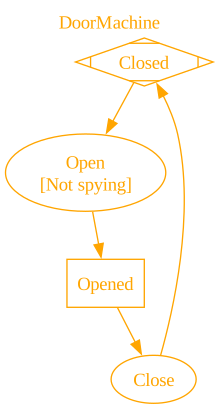
The first example on this page is the door sample (DoorMachine / DoorContext). The DOT below is what DoorMachine.ToDot() emits; the image is the same file rendered with dot -Tpng.
|
|
More generally, the DOT export uses rectangles for states, ellipses for triggers, and incorporates guard labels from When(..., label) inside the trigger label (for example Open\n[Not spying]), as in the transition table above. Cluster subgraphs represent nested regions; start marks the root initial state when applicable; terminal states with no outgoing transitions use Msquare.
Mermaid export uses state declarations and arrows directly. Guards and dynamic target hints are rendered with Mermaid <<choice>> nodes so branch labels sit on the outgoing paths:
|
|
Dynamic targets. If you use TransitionTo(selector) without passing optional target hints, the diagram shows a single Dynamic target placeholder because the engine cannot know branches statically. Pass trailing labeled hints to document possible destinations:
.OnRoute(t => t.TransitionTo(
    (ctx, args) => args.Request.IsAdmin ? State.AdminDashboard : State.UserDashboard,
    (State.AdminDashboard, "Admin request"),
    (State.UserDashboard, "Standard request")))
ToDot() and ToMermaid() then draw one branch per distinct hinted destination and include the hint label (for example [Admin request]) on that branch. Hints affect diagrams only, not runtime target resolution.
Stay on a composite. Graphviz does not support edges that start or end on a subgraph border. For an internal transition configured on a composite state, the exporter adds an invisible point node inside that cluster and renders the trigger plus trigger → anchor → trigger after the subgraph’s closing brace so the layout stays valid while still showing the self-loop semantics.
Mermaid can name composite states directly, so Stay() on a composite is rendered as a self-loop on the composite state after the composite block closes.
When multiple Mermaid transitions share the same source and target (for example several Stay() triggers on the same state), the exporter emits one edge and joins distinct labels with / so Mermaid does not hide earlier labels.
Testability
For application code, prefer injecting the generated factory delegates instead of calling the static CreateActor / CreateActorWithState methods from many places.
Register CreateActorFactory / CreateActorWithStateFactory and inject IStateMachineServiceProviderResolver (for example StateMachineServiceProviderResolver from Nalu.SharpState via the Nalu.SharpState.DependencyInjection package, StateMachineStaticServiceProviderResolver from Nalu.SharpState, or your own resolver implementation).
services.AddSingleton<DoorMachine.CreateActorFactory>(DoorMachine.CreateActor);

public sealed class DoorWorkflow
{
    private readonly DoorMachine.CreateActorFactory _createDoor;

    public DoorWorkflow(DoorMachine.CreateActorFactory createDoor) => _createDoor = createDoor;

    public DoorMachine.IActor Start(DoorContext context, IStateMachineServiceProviderResolver resolver) =>
        _createDoor(context, resolver);
}
If you need a specific starting State instead of the root initial state, use the matching …WithStateFactory delegate and pass State as the last argument.
This keeps actor creation DI-friendly and unit-testable:
- tests can replace a factory delegate with a lambda
- the lambda can return a mocked or fake
DoorMachine.IActor - production code can still use the static
DoorMachine.CreateActor/CreateActorWithStateoverloads as the implementation behind the delegate
Unit testing
With NSubstitute, a unit test can stub both the factory and the generated actor:
var actor = Substitute.For<DoorMachine.IActor>();
var factory = Substitute.For<DoorMachine.CreateActorFactory>();
factory(Arg.Any<DoorContext>(), Arg.Any<IStateMachineServiceProviderResolver>()).Returns(actor);

var workflow = new DoorWorkflow(factory);
var resolver = Substitute.For<IStateMachineServiceProviderResolver>();
var result = workflow.Start(new DoorContext(), resolver);

result.Should().BeSameAs(actor);
And if your application code calls triggers on the actor, you can verify those too:
var actor = Substitute.For<DoorMachine.IActor>();

actor.Open("delivery");

actor.Received().Open("delivery");
Unhandled triggers
OnUnhandled defaults to a handler that throws InvalidOperationException with the current state and trigger in the message. This surfaces programming mistakes early (e.g. firing Close while the door is already closed and no .OnClose is configured for that state).
You have three options:
// 1) Default: throws on unhandled
door.Open("again");  // InvalidOperationException if not configured

// 2) Custom handler (logging, metrics, retries...)
door.OnUnhandled = (state, trigger, args) =>
    telemetry.Track("UnhandledTrigger", state, trigger);

// 3) Opt out: silent no-op
door.OnUnhandled = null;
If a trigger should be accepted silently from a given state, prefer modeling that directly:
[StateDefinition]
private static IStateConfiguration Running { get; } = ConfigureState()
    .OnHeartbeat(t => t.Ignore());
StateChanged
StateChanged fires once per committed transition, with the original leaf, the new leaf, the trigger, and a TriggerArgs value carrying the trigger payload. If the context implements IStateAwareContext<State>, OnStateChanged on the context runs first (see Context notifications).
- Use
args.TryGetValue(out DoorMachine.OpenArgs open)or similar to inspect the trigger-specific payload without boxing.
door.StateChanged += (from, to, trigger, args) => { /* log, react, ... */ };
It is not raised when:
- The transition is internal (
.Stay()). - A dynamic
TransitionTo(...)resolves to the current leaf, so that fire collapses into internal behavior. - The trigger was unhandled (
OnUnhandledis raised instead).
Guards and actions
Guards and actions receive the context and the generated trigger args struct. Extra callback parameters request services from IServiceProvider; SharpState resolves them with GetService(typeof(T)) and throws if a required service is missing.
[StateTriggerDefinition] static partial void Withdraw(decimal amount, string note);

[StateDefinition]
private static IStateConfiguration Open { get; } = ConfigureState()
    .OnWithdraw(t => t
        .When((ctx, args) => args.Amount <= ctx.Balance)
        .TransitionTo(State.Open)
        .Invoke<ILogger<AccountContext>>((ctx, args, logger) =>
        {
            logger.LogInformation("Withdrawing {Amount} ({Note})", args.Amount, args.Note);
            ctx.Balance -= args.Amount;
            ctx.Ledger.Add(($"-{args.Amount}", args.Note));
        }))
    .OnWithdraw(t => t
        .Stay()
        .Invoke<ILogger<AccountContext>>((ctx, args, logger) =>
        {
            logger.LogWarning("Insufficient funds for {Amount}", args.Amount);
            ctx.Ledger.Add((args.Note, $"insufficient for {args.Amount}"));
        }));
Guards are pure predicates; keep them free of side effects. Invoke(...) runs inline during dispatch and any exception it throws propagates out of the trigger before the new state is committed.
Post-Transition Async Work
Use WhenExitedAsync(...), WhenEnteredAsync(...), and ReactAsync(...) when the transition should commit before asynchronous follow-up work runs. ReactAsync callbacks start with (actor, context, args) and can request services after that.
[StateDefinition]
private static IStateConfiguration Pending { get; } = ConfigureState()
    .OnRequestApproval(t => t
        .TransitionTo(State.Approving)
        .ReactAsync<IApprovalService>(async (actor, ctx, args, approvals) =>
        {
            try {
                await approvals.ApproveAsync(args.Id);
                await actor.ApproveAsync();
            } catch {
                await actor.RejectAsync();
            }
        }));
For external transitions, the order is:
WhenExiting(...)Invoke(...)- state commit
WhenEntering(...)StateChangedWhenExitedAsync(...)WhenEnteredAsync(...)ReactAsync(...)
Synchronous triggers capture the current SynchronizationContext and schedule that pipeline. Generated *Async triggers await it inline and allow reactions to fire more async triggers after the first transition has committed. If post-transition async work throws, the exception is surfaced through ReactionFailed; awaited triggers also throw ReactionFailedException.
What next?
- Hierarchical State Machines — nested composite states via
[SubStateMachine]. - Post-Transition Async Work — async lifecycle hooks,
ReactAsync(...),*Asynctriggers, andReactionFailed. - Diagnostics & Troubleshooting — generator errors (
NSS001–NSS010) and common pitfalls.